Join the best erotica focused adult social network now
Login

Notification (bell icon) settings

last reply
26 replies
1.1k views
4 watchers
1 like

I don't mind getting notifications for comments, messages etc. but the notifications for wall posts of my friend group is are legion. Any way to mute those but allow other notifications? Maybe I've just missed the notification settings options.

My newest story! An Island Competition entry: The Mermen of Jibei

Here is my back catalog: Charlotte's Pretty Hot Stories

Quote by CharlotteRusse1

I don't mind getting notifications for comments, messages etc. but the notifications for wall posts of my friend group is are legion. Any way to mute those but allow other notifications? Maybe I've just missed the notification settings options.

Are you referring to groups? If so there is an Unsubscribe option on the group cover image... that will switch off notifications.

Is there a way to shut them all off entirely? I'm not always alone when I'm browsing or chatting and I sometimes have a YouTube video playing in the background to not arouse suspicion, but the bell draws attention..

Quote by happynakedwife

Is there a way to shut them all off entirely? I'm not always alone when I'm browsing or chatting and I sometimes have a YouTube video playing in the background to not arouse suspicion, but the bell draws attention..

There is not sorry. However, they are not audible.

Quote by simplyjohn

There is not sorry. However, they are not audible.

They are on my end. Maybe it's a browser issue, but I appreciate you responding.

Quote by happynakedwife

They are on my end. Maybe it's a browser issue, but I appreciate you responding.

I have a set of headphones plugged into the audio jack of my computer. They're often on the table next to me but if I want it to appear that I'm watching that youtube video I put them in.

Best Friend Exchange Club: Here
Artist stories start at Artist -- Chapter 1
Starbucks Reverie at Starbucks Reverie

Teacher at Teacher

And please read my competition entry:There's Always Time. A sweet love story set in a time traveling universe.

There does not seem be an audible component to Lush notifications in the browser I use (LibreWolf). I watched the applications accessing the audio service from LW, and, while other applications do appear there, with audible sound, nothing from Lush notifications appears. A Lush audio story DOES cause an entry, so it seems to be notification dependent somehow.

AHHH... I'd forgotten... LW has a 'block notifications' setting which I have set to block those from Lush. I see the bell icon change, but no sound. Your browser may have a similar setting.

Quote by Charlotte_

I have a set of headphones plugged into the audio jack of my computer. They're often on the table next to me but if I want it to appear that I'm watching that youtube video I put them in.

Is that ALL you put in, Babe?????????? 😇😇😇

I have an ongoing notification issue. It works great for a few weeks - that is, I click on a notification, it takes me to the appropriate place and the notification disappears. the last 2 days it's not working again. I click on a notification, it takes me to the appropriate place but the notification doesn't disappear. So now I have to go b ack and click the X to make it go away. I know John has looked into this, but it doesn't seem to happen to him, so nothing gets fixed on my end.

Does anyone else have this issue?

Quote by darkroot50

I have an ongoing notification issue. It works great for a few weeks - that is, I click on a notification, it takes me to the appropriate place and the notification disappears. the last 2 days it's not working again. I click on a notification, it takes me to the appropriate place but the notification doesn't disappear. So now I have to go b ack and click the X to make it go away. I know John has looked into this, but it doesn't seem to happen to him, so nothing gets fixed on my end.

Does anyone else have this issue?

It's fair to say that occasionally the notifications do 'play up'. However, in the main, the problem goes away without intervention because it is a timing issue. Furthermore I believe there is a routine, that runs on a daily basis, that clears up the anomalies.

Quote by simplyjohn

It's fair to say that occasionally the notifications do 'play up'. However, in the main, the problem goes away without intervention because it is a timing issue. Furthermore I believe there is a routine, that runs on a daily basis, that clears up the anomalies.

Thanks John. It is still doing it today, but to a lesser extent. I'll give it a few days to see if it goes back to one click and gone.

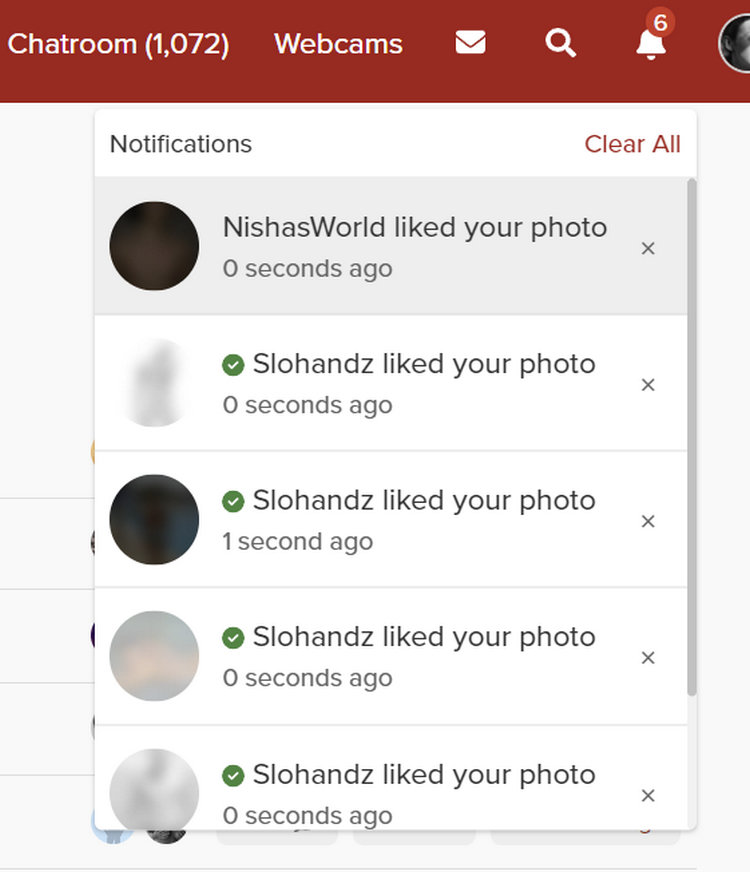
Are the alternating pink and blue murky circles masking message AVs part of the new Age/ID regulations?

Quote by kistinspencil

Are the alternating pink and blue murky circles masking message AVs part of the new Age/ID regulations?

Screenshot please since I am unclear what you mean.

Quote by simplyjohn

Screenshot please since I am unclear what you mean.

The glitch seems to have gotten sorted. After several days of blurs, the AVs are back to normal today -- of course. Several others were seeing the same thing, too. If it starts up again, I'll get a screen shot.

Quote by kistinspencil

The glitch seems to have gotten sorted. After several days of blurs, the AVs are back to normal today -- of course. Several others were seeing the same thing, too. If it starts up again, I'll get a screen shot.

Thanks.

I guess it's just me, then?

(Win/Chrome browser and AVs show fine everywhere else)

Quote by kistinspencil

I guess it's just me, then?

(Win/Chrome browser and AVs show fine everywhere else)

So what did you do because those notifications are no longer apparent?

Quote by simplyjohn

So what did you do because those notifications are no longer apparent?

The notices in the image disappeared as I opened them, if that is what you mean. It was several days ago. I haven't changed any settings on Lush or my browser. It happens randomly -- sometimes the drop down has proper Avs, sometimes (more often) they are just blurs like my image shows. I have noticed that if I get a bunch all from the same person, each one is different, so its not a blurring of their actual AV.

Quote by simplyjohn

For moi?

Part of the Lush bug reporting incentive plan -- I had to special order them. It took forever.

Quote by kistinspencil

Part of the Lush bug reporting incentive plan -- I had to special order them. It took forever.

Very kind... keep 'em coming please. smile

Quote by simplyjohn

It's fair to say that occasionally the notifications do 'play up'. However, in the main, the problem goes away without intervention because it is a timing issue. Furthermore I believe there is a routine, that runs on a daily basis, that clears up the anomalies.

Like you said John some routine seems to have cleared up the problem. 1 click, 1 notification and then it's gone. 👌👌👌 Thanks.

I'm going to be out of town soon and would prefer not to have 100's of notifications when I return. Is there a way to turn notifications off and on?

In short no. Upon your return simply 'Clear all'... same result.

Quote by simplyjohn

In short no. Upon your return simply 'Clear all'... same result.

Sounds like a reasonable solution. Thanks, John.